On this page
- Why choose the genuine Lexmark 56F0Z00 imaging drum
- Drum and toner: two consumables
- Printers compatible with the 56F0Z00
- Page yield
- Installation
- Use and tips
- Specifications
- Frequently asked questions
Why choose the genuine Lexmark 56F0Z00 imaging drum
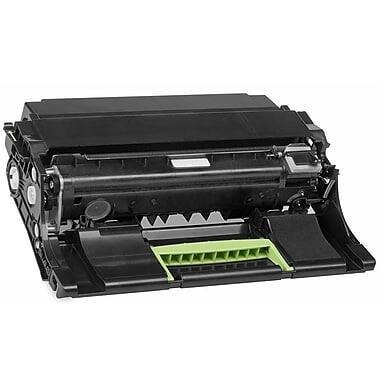
The drum (photoconductor) lays the toner onto the sheet; it is a wear part separate from the toner and outlasts several cartridges. A genuine Lexmark drum keeps sharpness and avoids marks repeated at regular intervals; the printer tracks its wear and signals replacement.
Drum and toner: two consumables
The toner holds the powder; the 56F0Z00 drum lays it on the sheet. The drum lasts about 60,000 pages. Marks repeated at regular intervals or a gray background: it is the drum to change, not the toner.
Printers compatible with the 56F0Z00
The 56F0Z00 is compatible with the following models and series (manufacturer data):
- MX622ade
- MX321adn
- MX321adw
- MX520 Series
- MX522adhs
- MX521ade
- MX320 Series
- MX421ade
- MX521de
- MX622adhe
- MX522adhe
- MX622adhs
- MX620 Series
- MX522dhe
- MX622de
- MB2442adwe
- MB2600 Series
- MB2546adwe
- MB2338adw
- MB2500 Series
- MB2546ade
- MB2650ade
- MB2650adwe
- MB2650awe
- MB2650 Series
- B2500 Series
- B2600 Series
- B2400 Series
- B2650dn
- B2546dw
- B2650 Series
- B2442dw
- B2546dn
- B2650dw
- B2442w
- B2338dw
- MS420 Series
- MS421dw
- MS621dn
- MS521dn
- MS321dn
- MS620 Series
- MS320 Series
- MS520 Series
- MS421dn
- MS622de
- MS321dntw
- M1242
- M3250
- M1246
- XM1246
- XM3250
- XM1242
Check the exact reference of your printer (label or Information menu); suffixes are variants of the same series and generally use the same consumables. If in doubt, send us the exact model.
Page yield
60,000 pages (manufacturer data, about 5% coverage). Graphics or photo-heavy pages reduce the actual yield.
Installation
Tool-free replacement: open the cover, remove the used assembly, unpack the new drum without touching the green surface or exposing it to light for long, refit and close. Follow the guide to reset the counter if the printer asks for it.
Use and tips
The 56F0Z00 drum is replaced far less often than the toner: about 60,000 pages. The printer's counter tracks its wear and warns ahead of time.
Keep the drum in its packaging until installation; do not touch the green surface and limit exposure to light. Marks repeated at regular intervals or a gray background: replace the drum, not the toner.
Specifications
| Manufacturer reference | 56F0Z00 |
|---|---|
| EAN code | 734646637497 |
| Type | Imaging drum |
| Brand | Lexmark |
| Color | black |
| Page yield | 60,000 pages (manufacturer data) |
| Origin | China |
| Compatible printers | 53 models or series |
Frequently asked questions
Is the 56F0Z00 compatible with my printer?
Yes if it appears in the list above. If in doubt, send us the exact model (e.g. "MX622ade") and we confirm.
Genuine or compatible?
We sell genuine Lexmark parts and consumables only: dimensions and lifetime in line with the manufacturer's data, printer warranty preserved.
Where can I find the safety data sheet?
The safety data sheet (SDS) for the 56F0Z00 and the manufacturer documentation are available on request from our customer service: contact us.